
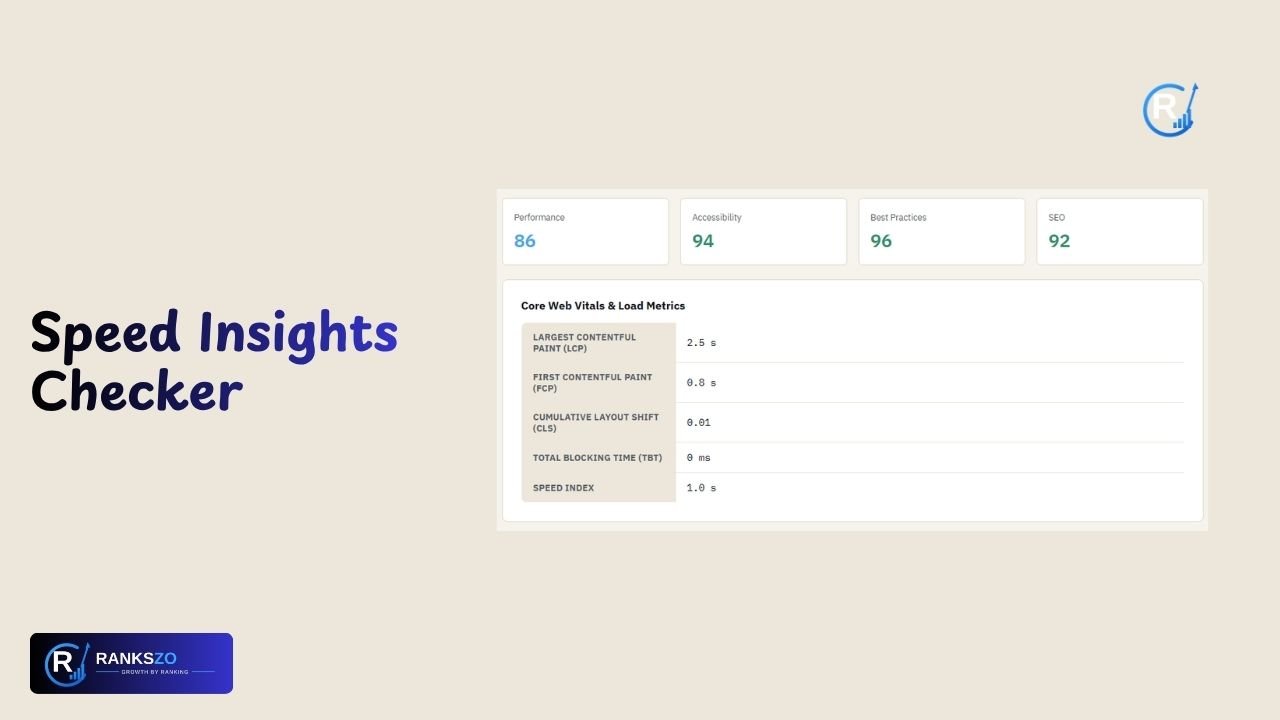
Website performance has a direct impact on how visitors experience a page. Slow loading, delayed interactions, and unstable layouts can make browsing frustrating. A speed insights checker helps website owners understand these performance issues and identify areas that may need improvement.
By analyzing important pages, you can discover technical problems and make informed optimization decisions. Regular testing also helps you compare results after website updates. Instead of guessing whether a page performs well, performance testing provides useful data for a more reliable website optimization strategy.
Speed Insights Checker at a Glance
A speed insights checker is designed to analyze webpage performance and provide useful information about loading and user experience. Google PageSpeed Insights allows users to enter a webpage URL and analyze its performance across supported environments.
The service provides performance results and recommendations that can help developers understand potential issues. Rankszo can be included in your website analysis workflow, while the exact features available should always be confirmed through its current tool interface.
What Is a Speed Insights Checker?
A speed insights checker is a tool that evaluates webpage performance and presents useful technical information. It can help website owners understand how efficiently a page loads and responds during testing.
PageSpeed Insights, for example, analyzes a submitted webpage and provides performance scores, audits, and suggestions. Its underlying system can use Lighthouse for controlled testing and Chrome User Experience data when available.
Why Website Speed Matters
Website speed matters because visitors expect pages to load and respond without unnecessary delays. A slow experience can make navigation frustrating and may affect how users interact with important website elements. Performance testing helps identify technical areas that deserve attention. However, speed is not the only measure of website quality. Useful content, accessibility, security, mobile usability, and clear navigation also matter. A speed insights checker is therefore best used as one part of a broader website improvement strategy.
How a Speed Insights Checker Works
Using a speed insights checker generally begins with a webpage URL. The testing system fetches the page and analyzes its performance using a defined testing environment. Results can include scores, audits, metrics, and recommendations depending on the tool. Google's PageSpeed Insights API describes its analysis as running against a specified URL and returning PageSpeed scores, suggestions, and other information.
What Does a Speed Insights Checker Measure?
Performance testing can examine several aspects of a webpage experience. These may include loading performance, responsiveness, visual stability, and technical implementation. PageSpeed Insights uses Lighthouse-related audits and can also provide user experience information when sufficient real-world data exists. Reviewing individual measurements is more useful than focusing only on an overall score because each metric can highlight a different performance concern.
Speed Insights Checker for Mobile
Mobile performance deserves careful attention because visitors use different phones, browsers, and network connections. A webpage that feels fast on a powerful desktop may behave differently on a mobile device. Testing mobile performance can reveal problems related to page resources, loading behavior, and responsiveness. Google's PageSpeed Insights supports different form factors for performance analysis. Mobile testing can therefore provide valuable information for improving the experience of smartphone users.
Speed Insights Checker for Desktop
Desktop testing provides another perspective on webpage performance. Different hardware, browsers, screen sizes, and network conditions can affect how a page behaves. A performance checker can help website owners review results under desktop testing conditions and compare them with mobile results. This comparison may reveal differences that are not visible during everyday browsing. Google's PageSpeed Insights system supports desktop and mobile analysis strategies, making both useful when evaluating a website's broader performance.
What Are Core Web Vitals?
Core Web Vitals are Google metrics designed to measure important parts of user experience. The current Core Web Vitals focus on loading, interaction responsiveness, and visual stability. They include Largest Contentful Paint, Interaction to Next Paint, and Cumulative Layout Shift. Google replaced First Input Delay with Interaction to Next Paint as a Core Web Vital. Understanding these metrics can help website owners focus on meaningful user experience improvements rather than simply chasing a higher performance score.
Speed Insights Checker and SEO
Website performance can support a broader SEO strategy, but a performance score should not be treated as a complete SEO measurement. Search visibility depends on many factors, including relevance, helpful content, technical accessibility, links, and overall user experience. A speed insights checker can help identify performance problems that deserve attention during technical SEO work. PageSpeed Insights also includes SEO-related audit categories through its Lighthouse reporting system.
How to Improve Website Speed
Improving website speed starts with understanding the specific problems identified during testing. Depending on the website, useful actions may include optimizing images, reducing unnecessary scripts, improving resource delivery, and reviewing third-party elements. Performance recommendations should be evaluated carefully because every website has different technical requirements. After making changes, run another test and compare the results. This process helps determine whether an optimization produced a meaningful improvement instead of assuming that every recommendation will benefit every webpage equally.
Why You Should Test Important Pages
Different webpages can have completely different performance characteristics. A homepage may be lightweight, while a product page, article, category page, or landing page may contain larger images and additional scripts. Therefore, testing only the homepage may not provide a complete picture. Focus on important pages and representative templates when analyzing a larger website. Testing these URLs can help identify performance patterns and reveal problems that might otherwise remain hidden. This approach makes performance optimization more targeted and practical.
Speed Insights Checker for Website Audits
Website performance testing can become an important part of a technical website audit. You can compare performance findings with indexing, crawlability, mobile usability, structured data, security, content quality, and other technical factors. This broader process provides more useful information than relying on speed alone. A performance report can identify areas that deserve technical attention, while other audit checks explain different website problems. Combining these insights helps website owners prioritize improvements based on actual needs instead of focusing on one isolated measurement.
Why Performance Scores Can Change
Performance results can change between tests because testing conditions and webpage resources are not always identical. Network conditions, server response times, third-party scripts, device characteristics, and page changes can influence results. PageSpeed Insights can provide both Lighthouse-based analysis and real-user experience information where available, so users should understand which data they are reviewing. Comparing results over time can provide better insight than relying on one test.
How Often Should You Check Website Speed?
There is no single testing schedule that suits every website. However, checking performance after major changes can be useful. Consider testing important pages after redesigns, theme updates, image replacements, plugin installations, script changes, or hosting adjustments. Regular checks can also help identify unexpected performance declines. Keeping previous results makes comparisons easier and provides a simple performance history. Instead of testing only when visitors report problems, website owners can include performance checks within their regular technical maintenance and SEO workflow.
Speed Insights Checker by Rankszo
The speed insights checker can be useful for website owners who want to investigate page performance as part of their SEO workflow. Rankszo can support broader website research, while the exact features and metrics available should be confirmed through the current Rankszo tool interface. Users should review the actual measurements and recommendations produced by their testing process. Combining performance analysis with keyword research, technical SEO checks, content evaluation, and other website metrics can provide a more complete understanding of overall website health.
Final Thoughts
A speed insights checker offers a practical way to analyze webpage performance and discover areas that may require improvement. It can help website owners understand loading behavior, responsiveness, and other technical performance factors. However, a single score does not describe the complete quality of a website. The best approach combines performance testing with useful content, technical SEO, accessibility, security, and user experience. By testing important pages regularly and reviewing individual metrics, you can make more informed decisions about website optimization.
Frequently Asked Questions
What is a speed insights checker?
It is a tool that analyzes webpage performance and helps identify possible speed and user-experience issues.
Why should I use a speed insights checker?
It helps you discover performance problems and understand where your webpage may need optimization.
Can a speed insights checker improve SEO?
The tool does not improve SEO itself, but its findings can help you address technical performance issues.
Should I test mobile performance?
Yes. Mobile testing helps you understand how your website performs for visitors using smartphones and mobile networks.
What are Core Web Vitals?
Core Web Vitals are user-focused Google metrics covering loading, interaction responsiveness, and visual stability.
Is a high speed score enough?
No. A high score does not guarantee excellent content, usability, accessibility, or overall website quality.
Should I test every webpage?
For large websites, focus first on important pages and representative templates rather than testing every URL.
When should I check website speed?
Check after major website changes and periodically during ongoing technical maintenance.